



定义 LangGraph State的方式有哪些?
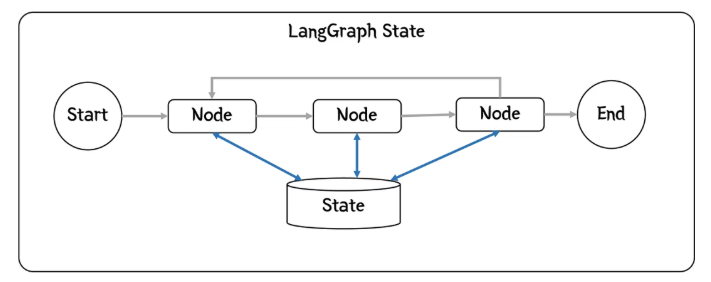
首先,将介绍一下 LangGraph中的全局状态(或简称状态)的概念。下面,我们将简单介绍一下State,State管理实际工作会复杂很多。
每个节点在执行时都会被赋予一个状态。执行完毕后,它会将所有更改返回给后续节点使用(如果再次被调用,则返回给自身)。
返回的信息可以添加到状态中,替换已有的内容,与现有内容合并,或者在列表的情况下添加到列表中。
这样,随着工作流程的推进,工作流程的全貌便逐渐形成,并可用于做出决策或生成最终结果。
一、定义状态
构建 LangGraph 图时,状态对象会与该图关联:
# Build graphgraph_builder = StateGraph(GraphState)graph_builder.add_node(nodes...
GraphState 类会定义智能体需要的字段,StateGraph会返回一个用于构建图的构建器,在构建器上逐渐增加node和edge,从而可以构建完整的Graph。
二、GraphState
接下来,就是如何定义 GraphState 类,它应该包含哪些内容,应该如何初始化,以及如何确保它始终有效?
在LangGraph中有三种方式可以定义类型安全:
- TypeDict (来自内置的 Python 类型模块);
- @dataclass (也是 Python 内置的类型机制);
- Pydantic (来自外部 Pydantic 模块);
2.1 TypeDict
定义状态类型( GraphState )
from typing import TypedDict, Listclass GraphState(TypedDict):# Tracks the current risk level determined by the modelrisk_level: str# A list of questions that the AI needs to ask the userquestions: List[str]# The running context of the conversation, including all previous questions and answersfull_context: str
要访问节点的状态,请使用以下代码:
def AssessRiskNode(state: GraphState) -> GraphState:# The type checker knows `state` is a dictionary with these keys.current_questions = state["questions"]current_context = state["full_context"]
也可以这样初始化它:
initial_state: GraphState = {"risk_level": "unclear","questions": [],"full_context": ""}# Build the graphbuilder = StateGraph(GraphState)builder.add_node(...)...app = builder.compile()# Invoke the graph with the initial stateoutput = app.invoke(initial_state)
编译时会应用静态类型检查。然而,运行时,`Python` 会将其视为一个简单的字典。如果节点返回的值是由 LLM 创建的,那么由于缺乏验证,运行时状态可能无效。
2.2 @dataclass
这种标准的 Python 注解也可以进行状态管理,它允许在类内部进行初始化:
from dataclasses import dataclass, fieldfrom typing import List@dataclassclass GraphState:# Tracks the current risk level determined by the modelrisk_level: str = "unclear"# A list of questions that the AI needs to ask the userquestions: List[str] = field(default_factory=list)# The running context of the conversationfull_context: str = ""
请注意, questions 字段的初始化使用了 ` default_factory=list 方法。这确保了为每个实例化的状态创建一个新的列表对象,避免了可能与不同用户关联的图调用之间的“串扰”。
这也意味着可以使用点号表示法访问这些字段:
def AssessRisk(state: GraphState) -> GraphState:# The type checker knows `state` is a dictionary with these keys.current_questions = state.questionscurrent_context = state.full_context
这种方式与 TypeDict 类似,但不需要初始化字段。
initial_state: GraphState()# Build the graphbuilder = StateGraph(GraphState)builder.add_node(...)...app = builder.compile()# Invoke the graph with the initial stateoutput = app.invoke(initial_state)
与 TypeDict 一样,它也没有运行时验证。
2.3 Pydantic
Pydantic是一个第三方库,必须先安装才能使用。Pydantic 的优点在于它会在运行时执行验证,防止出现无效状态,但同时也会带来其他问题,例如 LLM 生成无效响应时产生的运行时错误。
Pydantic定义 GraphState :
from typing import List, Optionalfrom pydantic import BaseModel, Fieldclass GraphState(BaseModel):# Tracks the current risk level determined by the modelrisk_level: str = "unclear"# A list of questions that the AI needs to ask the userquestions: List[str] = field(default_factory=list)# The running context of the conversation (optional as it is not initially defined)full_context: Optional[str] = None
这与使用 @dataclass 非常相似。
这里继承 BaseModel ,这是 Pydantic 运行时模型,它允许我们对状态进行运行时验证。
Pydantic 也允许我们使用点号表示法访问字段:
def AssessRisk(state: GraphState) -> GraphState:# The type checker knows `state` is a dictionary with these keys.current_questions = state.questionscurrent_context = state.full_context
创建图的方法与之前相同,但可以根据需要添加不同的初始化,因为 Pydantic 会验证传递的值:
initial_state = {"risk_level": "unclear","questions": [],"full_context": "The user wants a risk assessment."}# Build the graphbuilder = StateGraph(GraphState)builder.add_node(...)...app = builder.compile()# Invoke the graph with the initial stateoutput = app.invoke(initial_state) 结论:建议使用Pydantic,原因如下:
- 有运行时验证,这样可以定位 LLM 响应问题;
- 内置了JSON 序列化功能;
- 即使结构变得复杂,它仍然能按预期运行(比如为每个步骤向状态添加子结构)
- 三、读取LLM输出内容
上文探讨了如何定义状态以及如何将其传递给节点(和边),现在我们来看看如何从LLM那里得到答案,并将其反馈给State。
3.1 输出结构的重要性
我们的代码能够以某种结构化数据的形式接收 LLM 的响应至关重要。如果没有结构,我们的代码就无法对输出进行任何操作。
LLM 的一个重要特性是,它可以被指定以某种声音或角色进行回复。我们可以要求 LLM 以某种结构(例如 JSON)输出其内容,这将简化输出的解析。
让我们来看看该如何做到这一点。
3.2 结构化输出
当 LLM 做出响应时,结果会被传递回节点,对其进行解析并转换为与状态兼容的内容。
实现此目的的最佳方法是使用 Pydantic 的 PydanticOutputParser 。此函数接收非结构化的 LLM 输出并将其转换为 Pydantic 类型。这样做还有另一个好处,那就是可以使用其配套函数 get_format_instructions 。
3.3 创建解析器
首先,我们定义一个解析器,它将接收 LLM 的输出,并将其转换为我们状态所需的结构:
defence_analysis_parser = PydanticOutputParser(pydantic_object=DefenceAnalysis)在这个例子中,我们将它解析成 DefenceAnalysis 类定义的结构。
3.4 提示词模板
defence_analysis_prompt = PromptTemplate(template="""SituationYou are an expert Australian bushfire risk assessor evaluating my...Context: {full_context}{format_instructions}""",input_variables=["full_context"],partial_variables={"format_instructions": defence_analysis_parser.get_format_instructions()},)
input_variables 参数定义了调用 invoke() 时的输入值。
partial_variables 参数定义了创建模板时要插入的值。
defence_analysis_parser.get_format_instructions() 是一个函数,它接受传递给解析器( DefenceAnalysis )的 Pydantic 模式,并创建一组指令,告诉 LLM 如何格式化其输出,以便解析器可以将其解析为已定义好的模式。
现在,当 LLM 输出时,LangChain 调用将返回预期(和已验证)模式的值。
本文内容仅供参考,不构成任何专业建议。使用本文提供的信息时,请自行判断并承担相应风险。